
Konica Minolta 512 & 512i Print Head Maintenance Guide
Konica Minolta 512 and 512i print heads are widely used in solvent printers, UV printers, and large‑format flex printing machines across India. Known for durability and high ink tolerance, these heads still require proper maintenance to ensure consistent print quality and long service life.
At Edge Print (edgeprint.in), we support print businesses with expert guidance, genuine spare parts, and maintenance solutions for Konica print heads.
About Konica Minolta 512 & 512i Print Heads
Konica 512 series heads are industrial piezo print heads designed for high‑volume production and harsh ink environments.
Technical Specifications
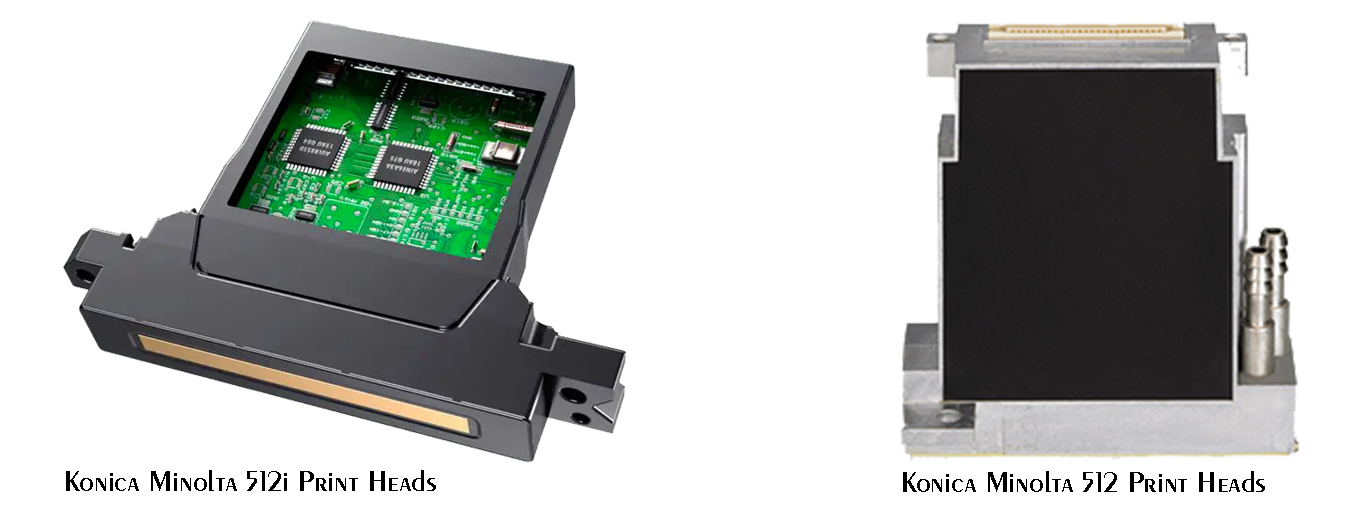
| Specification | Konica 512 | Konica 512i |
|---|---|---|
| Print Technology | Piezo Drop-on-Demand | Piezo Drop-on-Demand |
| Nozzle Count | 512 | 1024 |
| Native Resolution | 360 dpi | 360 dpi |
| Drop Size | 42 pl | 14 pl / 30 pl |
| Ink Compatibility | Solvent, Eco Solvent | Solvent, UV |
| Typical Applications | Flex, Vinyl, Banner | UV, Hybrid, Industrial |
Why Maintenance Is Critical (Indian Conditions)
In Indian print shops, heat, dust, and long working hours can accelerate print head wear. Poor maintenance can cause:
- Nozzle blockage due to ink drying
- Ink misfiring and banding
- Electrical failure from ink backflow
- Premature head replacement
Regular maintenance protects your investment and ensures stable production output.
Daily Maintenance Process (Recommended)
1. Nozzle Test Pattern
- Perform nozzle check before starting production
- Identify missing or weak nozzles early
2. Automatic Cleaning Cycle
- Use normal cleaning only when required
- Avoid frequent strong/deep cleaning
3. Capping Station Check
- Ensure caps are airtight and clean
- Replace worn caps immediately
Suggested Image: Konica 512 nozzle test pattern
Weekly Manual Cleaning Procedure
Tools Required
- Konica‑approved cleaning solution
- Lint‑free wipes / foam swabs
- Gloves (recommended)
Cleaning Steps
- Move carriage to maintenance position
- Apply cleaning solution to swab (do not drip)
- Gently wipe nozzle plate in one direction
- Clean surrounding ink residue
- Perform nozzle test after cleaning
⚠️ Never touch nozzles with hard, metal objects or tissue paper.
Suggested Image: Technician cleaning Konica print head
Monthly & Preventive Maintenance
- Inspect dampers for ink backflow or air bubbles
- Check ink filters and tubing
- Verify head alignment and head height
- Flush ink lines if printer is idle for long periods
Preventive maintenance reduces unexpected downtime in high‑volume production environments.
Best Operating Environment for Konica Heads
✔ Temperature: 20–30°C
✔ Humidity: 40–60%
✔ Dust‑free printing area
✔ Daily printer power‑on recommended
Maintaining proper environment is essential for UV and solvent inks.
Common Problems & Solutions
| Issue | Possible Cause | Solution |
|---|---|---|
| Missing nozzles | Ink drying | Manual cleaning + environment control |
| Banding | Partial nozzle block | Light cleaning + alignment |
| Ink dripping | Damaged damper | Replace damper immediately |
| No firing | Electrical issue | Professional inspection |
When to Replace the Print Head
- Persistent nozzle loss despite cleaning
- Electrical failure
- Severe ink leakage
- Unstable jetting
Early diagnosis can often prevent complete print head failure.
Konica Print Head Maintenance Support by Edge Print
At Edge Print India, we provide:
- Konica Minolta 512 & 512i print heads
- Special Cleaning solutions, Subtanks, capping stations & consumables
- Technical guidance for installation & maintenance
- Support for solvent, UV & hybrid printers
📞 Need Konica Minolta print head maintenance or replacement?
Visit edgeprint.in or contact our technical team today Whatsapp at +919899726655.